A home screen you choose
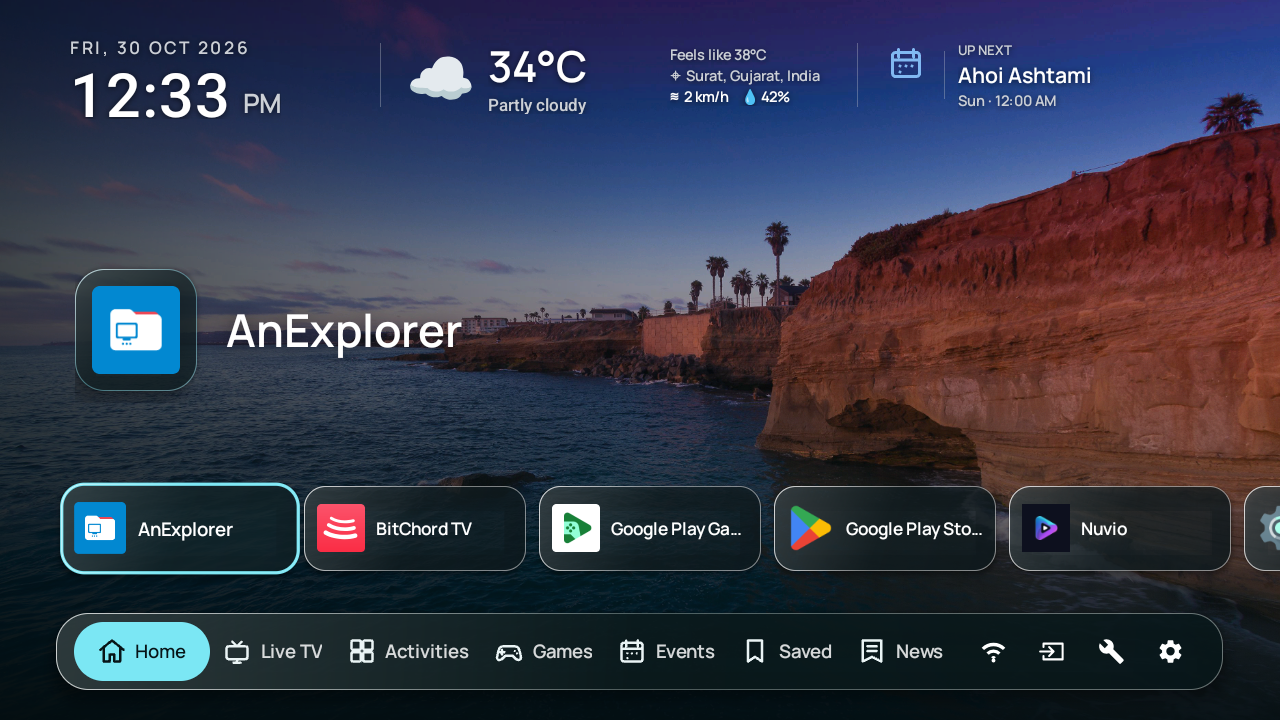
Select and reorder app shortcuts. Keep the clock, date, weather, Wi-Fi and tools close to hand.
 SvaLauncherGet Sva
 Apps you chose. Channels you added. Photos you took. A home screen that puts them all within reach of your remote.
Android TV 8.0+ · GPLv3 open source
No ads, analytics or tracking SDKs.
Try the remote. Or use ← → while a screen tab is focused.
Get to know the name
Open source. Personal by design. Built by Stardust Technology for the screen you come home to.
The logo from our Google Play listing.
Make room for what you use
From a quick weather check to an evening of live TV. Find the parts that fit the way you use your screen.
Select and reorder app shortcuts. Keep the clock, date, weather, Wi-Fi and tools close to hand.
Use a single image, rotate a local folder or connect a public Google Photos album. Widget contrast adapts to the image.
Combine M3U/M3U8 playlists, browse channel groups and logos, and search, hide or restore channels.
XMLTV, XMLTV.GZ and JSON guides, now and next listings, category filters, programme progress and reminders.
Media3 ExoPlayer, HLS and DASH, Widevine and ClearKey DRM, custom headers and per-channel configuration.
Activities brings in available Android TV recommendation channels. Hide and reorder rows, then open a title in its publishing app.
Combine RSS and Atom feeds by publication time. Browse the headline carousel and open articles with Mozilla Readability.
Create YouTube video and playlist shortcuts. Edit titles and artwork or remove cards from settings.
Import your own .nes files and launch them with the embedded Nestopia UE core. No separate emulator menu.
Play with the remote or connect up to two Android gamepads. Remap controls and keep save data in local app storage.
Combine iCalendar feeds, see today’s events, browse twelve months in either direction and check selected-day details and lunar illumination.
Current weather and a three-day Open-Meteo forecast. Choose a city or optionally use approximate device location.
Nine screensaver styles for your Google Photos album, with optional captions, clock, weather and events.
Follow your TV language or choose one for Sva. Offline translations and right to left layouts for Arabic and Urdu.
Tabs load on demand. Recycled lists keep games, saved videos and file browsing light, with progress indicators that do not take remote focus.
Cached channels, guides, events, weather and artwork stay available where supported. Downloaded photos and local games can work offline.
Export preferences, app and channel choices, and IPTV/DRM settings as JSON. Browse internal storage or USB to save and restore backups.
Set independent refresh intervals for playlists, programme data, calendars, photos and Google Photos.
Arrange supported tabs and hide the sections you do not use. Home stays first. An optional Home button helper can reopen Sva on supported TVs.
GPLv3 open source, with no built in ads, analytics or tracking SDKs. Online sources are contacted directly by your TV.
Try a different word or reset the filters.
No ads. No analytics. No tracking SDKs.
A little less noise.
A lot more yours.
Meet Sva Memories
Your Google Photos album, in nine different moods. Select a style to see what makes it different.
Full-screen photographs, slow camera movement, edge shadows and cinematic crossfades.
Illustrative layouts with sample nature photos from Unsplash ↗. Your album supplies the photos in Sva. Follow Home’s public Google Photos album or choose a separate one. Preview it in settings, start it while Sva is idle, or choose Sva Memories in Android TV screensaver settings. Downloaded photos work offline; system activation depends on your TV.
23 interface languages
Follow your TV language or choose one in Settings → System → Language. Arabic and Urdu have right to left layouts. The choice applies to Sva Memories too.
Sva is the interface. Channels, feeds, games and photos come from you and the services you choose to connect.
After installation, choose Sva when Android asks for your Home app. Sva supports Android 8.0 and newer. You can also build it from the open source project.
.nes files from internal or USB storage.Combine playlists and guides, browse channel groups and logos, search or hide channels, and see current and upcoming programmes. The full-screen guide includes a shared time ruler, live progress, category filters and a Now shortcut.
Use Up/Down to change channels and Left/Right to browse programmes. Selecting a current programme starts playback; an upcoming programme can create a reminder five minutes before it starts. Sva supports HLS and DASH, Media3 ExoPlayer, Widevine and ClearKey DRM, custom HTTP headers and per-channel overrides. Playback compatibility depends on the TV and stream.
Import .nes files and launch them directly with the embedded Nestopia UE core. The remote arrows act as the D-pad, OK is A, holding OK is Start, and Back opens Resume, Restart and Exit. Gamepads can be remapped for up to two players; save data stays in Sva’s private app storage.
Set independent refresh schedules for photos, playlists, programme data, calendars and Google Photos. Cached content remains available when a network refresh is unavailable where supported.
Sva has no ads, analytics, tracking SDKs or account service. Public source requests are made directly from the TV. Wallpapers, imported games and cached data are stored locally. Location is optional; city search works without it.
Cached channels, guide data, calendar events, weather and artwork remain available offline where supported; previously downloaded photos work offline too. Live streams and fresh updates from online sources need a network connection.
JSON backups are unencrypted and may contain playlist URLs, DRM details, credentials, album links and weather coordinates. Keep backup files private. Use HTTPS for network sources when available.
Sva is a launcher and media front end. It does not include TV channels, programme data, ROMs, BIOS files, game artwork or paid-media credentials. Add content you’re allowed to access.
A closer look
Open a screenshot to see the details. Use the arrow keys to move through the gallery.
You supply your playlists, programme guides and legally usable NES files. Sva provides the interface and playback tools.
Local games and photos can work offline. Cached guide data, events, weather and artwork remain available where supported. Live streams and online source updates need a connection.
Join the Sva Launcher Google Group, then the Google Play testing programme using the same Google account as your TV. The setup section above has the links.
Sva has no built in ads, analytics or tracking SDKs. Connected media and feeds are fetched directly from your TV.
One more thing for your TV.
Join the Google Group and Play testing programme, then install Sva with the same Google account on your TV.